




Home Product info Support Downloads Buy now Login
 
 Home
Home page
About us
Our customers
 Product info
Details
Features
Buy now
Downloads
Screenshots
Video tutorials
 What others say
Awards
Reviews
User quotes
Case studies
 Support
Login
FAQ
Blog
Forums
Newsgroups
Send message
Online manual
Online manual .NET
Change log


Screenshots

Delphi Edition

.NET Edition
 

When you install EurekaLog.NET, a new menu option is added in the Visual Studio IDE: it allows you to access the configuration panel of the EurekaLog.NET.


Use the following options to customize the log sending (via Email or Web). You can choose if send the log via Email Client or SMTP Client/Server, and via Web you can choose if send it to a normal site or a BUG-Tracker site.


Use the following options to customize the EurekaLog.NET send behavior (common for "Email" and "Web" sending modes).

Use the following options to customize the Log's content. You can choose the Log path, the max number of Logs saved (in the same file), what to insert in the Log and other.


Use the following options to customize the Exception Dialogs style and content. You can choose the Dialog type to display. You can customize the HTML code used to display the HTML error page and other.

Use the following options to customize all the text messages that EurekaLog.NET will displays during its work. You can also create collections of messages to simplify its management.


Use the following options to customize the EurekaLog.NET behavior during the Exceptions processing. You can choose to manage different Exception Types with different behaviors.

Exception Filter detail.


This is the "Simple" Dialog that EurekaLog.NET shows when it runs into GUI (standard graphical application) applications.

This is "General" information shown by EurekaLog.NET when it runs into a GUI (standard graphical application) application.


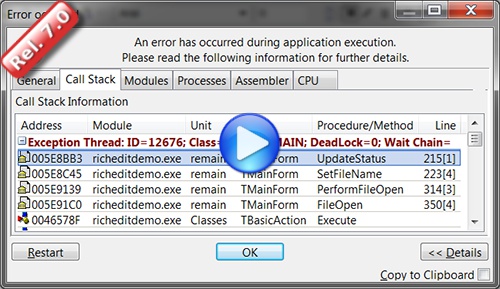
This is "Call-Stack" information shown by EurekaLog.NET when it runs into a GUI (standard graphical application) application.

This is "Modules" information shown by EurekaLog.NET when it runs into a GUI (standard graphical application) application.


This is "Processes" information shown by EurekaLog.NET when it runs into a GUI (standard graphical application) application.

This is information shown when EurekaLog.NET runs into a console application.


Information displayed into Web application.

Use this Viewer to analyze and process all the bug reports received from EurekaLog.NET (.el files).

About us Privacy policy Contacts Community
Copyright © EurekaLab s.a.s. - VAT ID: IT05554520824