Logging additional exception information |
  
|
Logging additional exception information |
|
|
EurekaLog creates bug reports for each unhandled exception in your app. For example (a part of bug report is shown):
Exception: ------------------------------------------------------------------------------------------------------------------------------- 2.1 Date : Sat, 11 Apr 2026 15:51:09 +0300 2.2 Address : 012AB618 2.3 Module Name : Project1.exe 2.4 Module Version: 1.0.0.0 2.5 Type : EAccessViolation 2.6 Message : Access violation at address 012AB618 in module 'Project1.exe' (offset A9B618). Write of address 00000000. 2.7 ID : 73BA1063
EurekaLog captures type (class) of the exception object and its message. However, some exception classes may have additional information. For example:
type
The EOleException class has the additional HelpFile and Source properties, and its ancestor (the EOleSysError class) also has an additional ErrorCode property.
Historically, EurekaLog only saves the exception class and its message to bug reports. This is because EurekaLog doesn't know about other exception classes, as other exception classes are defined in units other than System.SysUtils. For example, the EOleException class is defined in the System.Win.ComObj unit. Referencing this unit directly (so EurekaLog could reference the EOleException class) would mean that every application running EurekaLog would carry COM code.
The same is true for other classes: EUpdateError (defined in the Data.DB unit), EZipFileNotFoundException (defined in the System.Zip unit), ESocketError (defined in the System.Net.Socket unit), EJSONException (defined in the System.JSON unit), DOMException (defined in the Xml.xmldom unit), EXMLException (defined in the Xml.Internal.OmniXML unit), ERemotableException (defined in the Soap.InvokeRegistry unit), ERequestError (defined in the REST.Types unit), and so on - you get the idea: you definitely don't want to include all these units in your practically empty application if you're just adding EurekaLog to it.
Logging additional exception propertiesEurekaLog has the \Source\Extras\EExtraExceptionInfo.pas unit, which is added to each project with EurekaLog by default. Once the EExtraExceptionInfo unit is added to your project - it will register a callback which will save additional properties of known exception classes into bug reports produced by EurekaLog:
Exception: ----------------------------------------------------- 2.1 Date : Sat, 11 Apr 2026 20:35:48 +0300 2.2 Address : 0137F5D9 2.3 Module Name : Project1.exe 2.4 Module Version: 1.0.0.0 2.5 Type : EOleException 2.6 Message : Catastrophic failure. 2.7 ID : 2EBFEC43
Custom Information: --------------------------------------- 9.1 EOleSysError.ErrorCode: $8000FFFF
CustomizationThere is a catch though. The EExtraExceptionInfo unit knows only about exceptions from the System.SysUtils unit by default. If your project uses other units (such as System.Win.ComObj for the EOleSysError exception class from the example above) - these has to be enabled explicitly. The way to do this is to use conditional defines:
This will open the EExtraExceptionInfo.pas file in IDE's editor.
The beginning of the EExtraExceptionInfo.pas file has a detailed description of all exception classes which it supports:
...
You can browse this list and find units which are being used in your project. For example, if your project references the System.Win.ComObj unit - you would need the E_SYSTEM_WIN_COM_INFO symbol. If your project references the Data.DB unit - you would need the E_DATA_DB_INFO symbol. And so on.
Tip: if you don't know what units are being used in your project - use the "Start" / "Programs" / "EurekaLog" / "Tools" / "PE Analyzer" tool to look what is inside your compiled executable file.
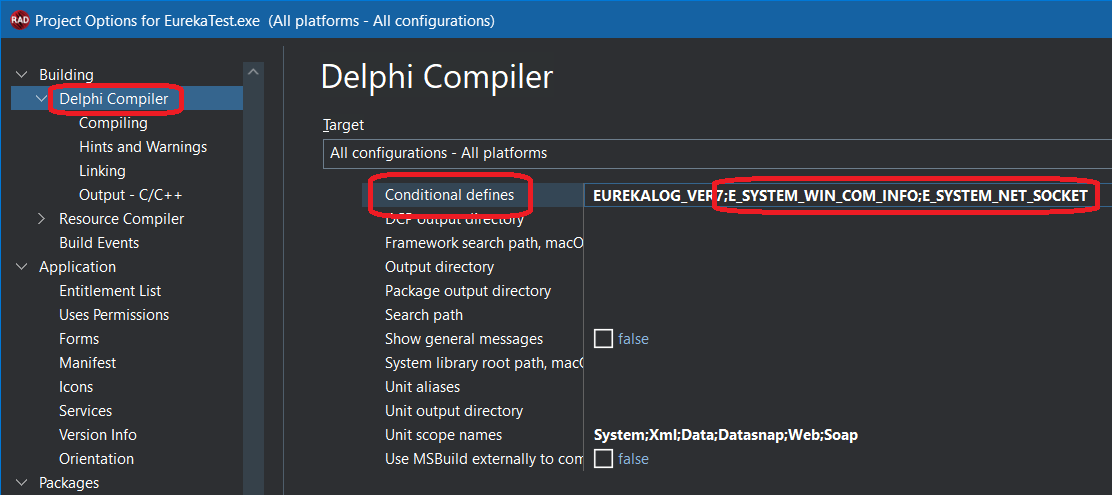
Once you have learned the names of all the symbols you need - go to project's options (use IDE's "Project" / "Options" menu item). Then open conditional defines settings. These can be located in various places - depending on your IDE and personality. For example, it is located on the "Building" / "Delphi compiler" tab for modern Delphi:
Add all symbol names which you learned on the previous step. We recommend to add symbol names either to the "All configuration" target or to the platform-specific target. Adding a symbol name will uncomment code in the EExtraExceptionInfo unit, which will include the corresponding unit and extract additional info. Like so:
uses
That is why the EExtraExceptionInfo unit is placed as source code (.pas) file into the \Source\Extras\ folder: so it can be recompiled from the source code when conditional defines change - unlike regular EurekaLog units which come precompiled and never change.
IMPORTANT NOTE: do not forget to make a full build of your project (not just compile) after changing the conditional defines option.
Using EExtraExceptionInfo with your own callbacksThe EExtraExceptionInfo unit adds exception information into the "Custom information" section of your bug reports. However, you may also add your own custom information. For example:
procedure AddMyData(const ACustom: Pointer; // Ask EurekaLog to call your code when a bug report is composed
How will your own event handler play with EurekaLog's EExtraExceptionInfo unit?
RegisterEvent* functions add event handlers into lists. EurekaLog would call each registered handler from a list until there are no more handlers or some handler would return ACallNextHandler = False. So, if you register your own OnCustomData event handler - it will be called together with the EExtraExceptionInfo unit, producing the following output (see code examples above):
Exception: ----------------------------------------------------- 2.1 Date : Sat, 11 Apr 2026 20:35:48 +0300 2.2 Address : 0137F5D9 2.3 Module Name : Project1.exe 2.4 Module Version: 1.0.0.0 2.5 Type : EOleException 2.6 Message : Catastrophic failure. 2.7 ID : 2EBFEC43
Custom Information: ------------------------------------------------- 9.1 EOleSysError.ErrorCode: $8000FFFF 9.2 License : kjlasdioj234879asd 9.3 User : example@example.com 9.4 Build : 3.5
Here: the 9.1 line is produced by the EExtraExceptionInfo unit, while the 9.2-9.4 lines are produced by your code (event handler).
The last argument for any RegisterEvent* function (named AFirst) defines if the function should add your handler to the beginning of the list (AFirst = True) or to the end (AFirst = False; default). For example, registering your handler like so:
initialization
will produce the following output:
Exception: ----------------------------------------------------- 2.1 Date : Sat, 11 Apr 2026 20:35:48 +0300 2.2 Address : 0137F5D9 2.3 Module Name : Project1.exe 2.4 Module Version: 1.0.0.0 2.5 Type : EOleException 2.6 Message : Catastrophic failure. 2.7 ID : 2EBFEC43
Custom Information: ------------------------------------------------- 9.1 License : kJlaSdioj23t879aSd 9.2 User : example@example.com 9.3 Build : 3.5 9.4 EOleSysError.ErrorCode: $8000FFFF
As you can see, now it is your output listed first, followed by the output from the EExtraExceptionInfo unit.
And since your handler will be called first (before EExtraExceptionInfo unit) - you can also do something like this:
procedure AddMyData(const ACustom: Pointer;
Additionally, if you don't want to add additional exception properties to the custom information section - you can change this behaviour to adding additional exception properties to exception's message. You need to add the E_ADD_CUSTOM_MESSAGE symbol to conditional defines. Doing so will produce the following output:
Exception: ----------------------------------------------------- 2.1 Date : Sat, 11 Apr 2026 20:35:48 +0300 2.2 Address : 0137F5D9 2.3 Module Name : Project1.exe 2.4 Module Version: 1.0.0.0 2.5 Type : EOleException 2.6 Message : Catastrophic failure. ErrorCode=$8000FFFF 2.7 ID : 2EBFEC43
Custom Information: ---------------------------------- 9.1 License: kJlaSdioj23t879aSd 9.2 User : example@example.com 9.3 Build : 3.5
Here: the "ErrorCode" line is added to exception's message by the EExtraExceptionInfo unit with the E_ADD_CUSTOM_MESSAGE option, while "Custom Information" section is composed by your AddMyData OnCustomData event handler from the example above.
You may also enable the E_ADD_NO_CUSTOM_INFO option (by adding its symbol's name to conditional defines) to completely disable assist from the EExtraExceptionInfo unit.
See also:
| ||||||||||||