|
This article is about changing processing for some selected exceptions.
This article covers the following:
| • | Ignoring exception means EurekaLog will act like there was no EurekaLog installed. It means the exception will not be handled by EurekaLog. It usually means the exception will be handled by RTL/VCL, which will show MessageBox for the exception. |
| • | Expecting exception means EurekaLog will process exception, but not create bug report for it. In other words, EurekaLog dialog will be shown, but there will be no details (call stack, etc.), no sending will be performed. |
| • | Hiding exception means EurekaLog will process exception, create bug report, perform sending, but no exception dialog will be shown, all visual feedback will be disabled. |
| • | Suppressing exception means that exception will be completely hidden, in other words: act like EAbort. It means no dialog will be shown, no exception processing will take place. It is like a combination of expecting + hiding. |
See also:
Recommended
We recommend to set up exception processing in your own code when possible. For example, if you want to suppress an exception:
try
QueryDataView.Active := True;
except
on E: EEDBException do
begin
// Check if this is the exception that you want to suppress
if E.Message = '...' then // only as an example!
Abort // Suppress this exception
else
raise; // Process any other exception as usual
end;
end;
or:
procedure TForm1.ApplicationEvents1Exception(Sender: TObject; E: Exception);
begin
// Check if this is the exception that you want to suppress
if E.Message = '...' then // only as an example!
Exit; // Suppress this exception by doing nothing
// Process any other exception as usual
// If EurekaLog is installed - this code will call EurekaLog
// See also: How to handle an exception?
Application.ShowException(E);
end;
That way - your application will behave the same way with and without EurekaLog.
Not recommended
Use EurekaLog's customization features only when you can't modify your own code (for example, exception happens in 3rd party code outside of your control).
Step 1: Identify the exception
First, you have to identify exception which you want to ignore. You can identify exception by:
It is best to check/specify as much information as you can. Otherwise you may ignore/hide/suppress wrong exceptions as well.
Step 2: Alter the behavior
Once the exception is identified - you can instruct EurekaLog to ignore/expect/hide/supress this exception. You can:
| • | Instruct EurekaLog to ignore this exception. Exception will be handled by RTL/VCL, as if EurekaLog was not installed. Typically this means showing a MessageBox for the exception; |
| • | Instruct EurekaLog to consider this exception to be an expected exception. EurekaLog will handle the exception, but not show details, just the message. This means showing EurekaLog dialog for the exception, but no bug report will be created/send. See also for more details. |
| • | Instruct EurekaLog to hide exception by disabling dialog for it, but don't change/disable the usual processing (creating and sending report). |
| • | Instruct EurekaLog to "eat" (suppress) exception. Exception will not be handled/processed at all, it will "disappear". In other words, exception will act like EAbort. |
See also:
There are several available methods. Not all methods supports all of the features discussed above. This article covers the following options:
| 1. | Using custom attributes |
Option 1: Custom Attributes
Use custom attributes to change processing of a specific exception class:
1. Ignore the exception:
uses
EClasses, // for EurekaLogHandler
ETypes; // for fhtRTL
type
// Changes handler for this exception class to RTL
[EurekaLogHandler(fhtRTL)]
ETestException = class(Exception);
procedure TForm1.Button1Click(Sender: TObject);
begin
// ETestException will be ignored by EurekaLog and
// it always will be handled by your application
// (as if EurekaLog would be disabled).
// In other words, this will be catched by standard
// Application.HandleException method.
// The default MessageBox will be shown.
raise ETestException.Create('Error Message');
end;
2. Expect the exception:
uses
EClasses; // for EurekaLogExpected
type
// Mark this exception class to be always expected
[EurekaLogExpected()]
ETestException = class(Exception);
procedure TForm1.Button1Click(Sender: TObject);
begin
// ETestException will be handled by EurekaLog.
// However, it would be considered as "expected".
// In other words, this will be catched and shown by EurekaLog.
// But (EurekaLog) error dialog will lack
// "details", "send" and "restart" options.
// No bug report will be created. No sending will be performed.
raise ETestException.Create('Error Message');
end;
3. Hide the exception:
uses
EClasses, // for EurekaLogDialog
ETypes; // for edtNone
type
// Changes dialog for this exception class to "(None)"
[EurekaLogDialog(edtNone)]
ETestException = class(Exception);
procedure TForm1.Button1Click(Sender: TObject);
begin
// ETestException will be handled by EurekaLog as usual.
// Bug report will be created, sending will be performed.
// But no dialog will be shown.
raise ETestException.Create('Error Message');
end;
4. Suppress the exception:
uses
EClasses, // for EurekaLogHandler
ETypes; // for fhtNone
type
// Changes handler for this exception class to "(None)"
[EurekaLogHandler(fhtNone)]
ETestException = class(Exception);
procedure TForm1.Button1Click(Sender: TObject);
begin
// ETestException will be handled by EurekaLog.
// However, it would be completely hidden.
// No dialog, no bug report, no sending.
// Exception will act like EAbort.
raise ETestException.Create('Error Message');
end;
Read more about this method.
Option 2: Exception Filters
Use exception filters. Typically, you create exception filters at design-time:
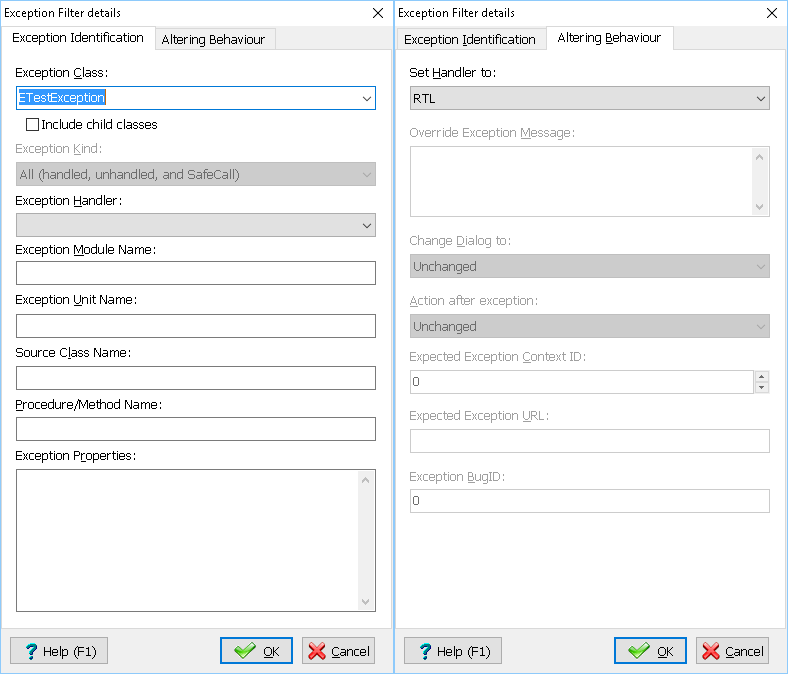
Ignoring ETestException exception
(by using "RTL" handler)
| • | Use "Set Handler to: RTL" to ignore the exception; |
| • | Use "Set Handler to: EurekaLog" + set "Expected Exception Context ID = -1" to expect the exception; |
| • | Use "Set Handler to: EurekaLog" + set "Change dialog to: (None)" to hide the exception. |
| • | Use "Set Handler to: (None)" to suppress the exception. |
You can also create exception filters manually from code:
1. Ignore the exception:
uses
EModules; // for CurrentEurekaLogOptions
CurrentEurekaLogOptions.ExceptionsFilters.AddIgnoredException(ETestException);
// ETestException will be ignored by EurekaLog and
// it always will be handled by your application
// (as if EurekaLog would be disabled).
raise ETestException.Create('Error Message');
2. Expect the exception:
uses
EModules; // for CurrentEurekaLogOptions
CurrentEurekaLogOptions.ExceptionsFilters.AddExpectedException(ETestException);
// ETestException will be handled by EurekaLog.
// However, it would be considered as expected.
// "details", "send" and "restart" options will not be shown.
// Bug report will not be created, no sending will be performed.
raise ETestException.Create('Error Message');
3. Hide the exception:
uses
EModules; // for CurrentEurekaLogOptions
CurrentEurekaLogOptions.ExceptionsFilters.AddHiddenException(ETestException);
// ETestException will be handled by EurekaLog.
// Bug report will be created, sending will be performed.
// However, no visual dialog will be shown.
raise ETestException.Create('Error Message');
4. Suppress the exception:
uses
EModules; // for CurrentEurekaLogOptions
CurrentEurekaLogOptions.ExceptionsFilters.AddSuppressedException(ETestException);
// ETestException will be handled by EurekaLog.
// However, it would be completely hidden.
// No dialog, no bug report, no sending.
// Exception will act like EAbort.
raise ETestException.Create('Error Message');
5. Fully customizable filter from code:
uses
EModules, // for CurrentEurekaLogOptions
ETypes; // for TEurekaExceptionFilter, fetAll, edtUnchanged, etc.
// Create a custom filter:
var
Filter: TEurekaExceptionFilter;
begin
FillChar(Filter, SizeOf(Filter), 0);
Filter.Active := True;
Filter.ExceptionClassName := ETestException.ClassName;
Filter.ExceptionType := fetAll;
Filter.DialogType := edtUnchanged;
Filter.HandlerType := fhtRTL;
Filter.ActionType := fatUnchanged;
CurrentEurekaLogOptions.ExceptionsFilters.Add(Filter);
// ETestException will be ignored by EurekaLog and
// it always will be handled by your application
// (as if EurekaLog would be disabled).
raise ETestException.Create('Error Message');
end;
Read more about this method here.
Option 3: Event Handlers
Use event handlers.
1. Ignore the exception:
uses
EEvents; // for RegisterEventExceptionNotify
type
ETestException = class(Exception);
procedure TForm1.Button1Click(Sender: TObject);
begin
// ETestException will be ignored by EurekaLog and
// it always will be handled by your application
// (as if EurekaLog would be disabled).
raise ETestException.Create('Error Message');
end;
// Our code to modify exception's processing for a particular exception
procedure IgnoreException(const ACustom: Pointer;
AExceptionInfo: TEurekaExceptionInfo;
var AHandle: Boolean;
var ACallNextHandler: Boolean);
begin
// Specify EurekaLog to ignore ETestException
if // this check matches ETestException only, but skips child classes
AExceptionInfo.ExceptionClass = ETestException.ClassName then
begin
// Do not call EurekaLog for this exception,
// In other words, exception will be processed by RTL/VCL
AHandle := False;
// No need to call any other event handlers (if any assigned)
ACallNextHandler := False;
Exit;
end;
end;
initialization
// Ask EurekaLog to call our code for exceptions
RegisterEventExceptionNotify(nil, IgnoreException);
end.
2. Expect the exception:
uses
EEvents; // for RegisterEventExceptionNotify
type
ETestException = class(Exception);
procedure TForm1.Button1Click(Sender: TObject);
begin
// ETestException will be handled by EurekaLog.
// However, it would be considered as expected.
// "details", "send" and "restart" options will not be shown.
raise ETestException.Create('Error Message');
end;
// Our code to modify exception's processing for a particular exception
procedure ExpectException(const ACustom: Pointer;
AExceptionInfo: TEurekaExceptionInfo;
var AHandle: Boolean;
var ACallNextHandler: Boolean);
begin
// Mark exception as expected, but allow it to be handled by EurekaLog.
if (AExceptionInfo.ExceptionObject <> nil) and
(AExceptionInfo.ExceptionNative) and
// this check matches ETestException and any of its child classes
(TObject(AExceptionInfo.ExceptionObject).InheritsFrom(ETestException)) and
// IMPORTANT NOTE: Please note that the .ExceptionObject may be unavailable even for Delphi exceptions!
// For example, if the exception object was already deleted:
//
// try
// raise Exception.Create('Inner Exception'); // - will be deleted
// except
// on E: Exception do
// raise Exception.Create('Outer Exception');
// end;
//
// See also.
// That is why we check for NIL in the example above.
// For this reason we highly recommend to use properties of AExceptionInfo when possible,
// Such as .ExceptionClass and .ExceptionMessage
(AExceptionInfo.ExceptionMessage = 'Error Message') then // Only as an example! See also below
begin
// Indicate that exception is expected
AExceptionInfo.ExpectedContext := -1;
// Don't change any other options,
// In other words, exception will be processed by EurekaLog
Exit;
end;
end;
initialization
// Ask EurekaLog to call our code for exceptions
RegisterEventExceptionNotify(nil, ExpectException);
end.
3. Hide the exception:
uses
EEvents, // for RegisterEventExceptionNotify
ETypes; // for atThread
type
ETestException = class(Exception);
// A background thread.
// This example assumes EurekaLog is enabled for RTL threads
// (it is not a default setting)
function ThreadFunc(P: Pointer): Integer;
begin
// ETestException will be handled by EurekaLog as usual.
// Bug report will be created, sending will be performed.
// But NO dialog will be shown.
raise ETestException.Create('Error Message From Background Thread');
end;
procedure TForm1.Button1Click(Sender: TObject);
var
TID: Cardinal;
begin
CloseHandle(BeginThread(nil, 0, ThreadFunc, nil, 0, TID));
// ETestException will be handled by EurekaLog as usual.
// Dialog will be shown, bug report will be created, sending will be performed.
raise ETestException.Create('Error Message From Main Thread');
end;
// Our code to modify exception's processing for a particular exception
procedure HideException(const ACustom: Pointer;
AExceptionInfo: TEurekaExceptionInfo;
var AHandle: Boolean;
var ACallNextHandler: Boolean);
begin
// Hide the exception
if Pos(atThread, AExceptionInfo.Handler) > 0 then // Only as an example! See also below
begin
// Disable all dialogs for this exception
AExceptionInfo.Options.ExceptionDialogType := edtNone;
AExceptionInfo.Options.sndShowSendDialog := False;
AExceptionInfo.Options.sndShowSuccessMsg := False;
AExceptionInfo.Options.sndShowSuccessBugClosedOnlyMsg := False;
AExceptionInfo.Options.sndShowFailureMsg := False;
end;
end;
initialization
// Ask EurekaLog to call our code for exceptions
RegisterEventExceptionNotify(nil, HideException);
end.
4. Suppress the exception:
uses
EEvents; // for RegisterEventExceptionNotify
type
ETestException = class(Exception);
procedure TForm1.Button1Click(Sender: TObject);
begin
// ETestException will be handled by EurekaLog.
// However, it would be completely hidden.
// No dialog, no bug report, no sending.
// Exception will act like EAbort.
raise ETestException.Create('Error Message');
end;
// Our code to modify exception's processing for a particular exception
procedure SuppressException(const ACustom: Pointer;
AExceptionInfo: TEurekaExceptionInfo;
var AHandle: Boolean;
var ACallNextHandler: Boolean);
begin
// "Eat" the exception
if AExceptionInfo.ExceptionMessage = 'Error Message' then // Only as an example! See also below
begin
// Indicate that the exception should be handled by EurekaLog, not VCL
AHandle := True;
// Indicate that the exception was already processed/handled,
// In other words, EurekaLog should do nothing
AExceptionInfo.Handled := True;
// No need to call any other event handlers
ACallNextHandler := False;
Exit;
end;
end;
initialization
// Ask EurekaLog to call our code for exceptions
RegisterEventExceptionNotify(nil, SuppressException);
end.
5. Here is an example of how you can check various properties of your exception (we recommend to specify as much as you can):
procedure ExceptionNotify(const ACustom: Pointer;
AExceptionInfo: TEurekaExceptionInfo;
var AHandle: Boolean;
var ACallNextHandler: Boolean);
begin
if // check exception's class name
(AExceptionInfo.ExceptionClass = 'EOSError') and
// check exception's message
(AExceptionInfo.ExceptionMessage = 'Access Denied') and
// check that there is an exception's object
(AExceptionInfo.ExceptionObject <> nil) and
// check that it is a Delphi/Builder object
(AExceptionInfo.ExceptionNative) and
// check exception's class
// (only for .ExceptionNative = True and .ExceptionObject <> nil)
(TObject(AExceptionInfo.ExceptionObject).InheritsFrom(EOSError)) and
// check any additional exception's properties
// (only for .ExceptionNative = True and .ExceptionObject <> nil)
(EOSError(AExceptionInfo.ExceptionObject).ErrorCode = ERROR_ACCESS_DENIED) and
// check call stack
(AExceptionInfo.CallStack.Count > 0) and
(AExceptionInfo.CallStack[0].Location.UnitName = 'ServiceProvider') and
(AExceptionInfo.CallStack[0].Location.ProcedureName = 'Connect') and
// check exception's address
(AExceptionInfo.Address = Pointer($00456789)) and
// check exception's module
(AExceptionInfo.Module = $00400000) and
(AExceptionInfo.Module = HInstance) and
// check exception's module name
SameFileName(ExtractFileName(AExceptionInfo.ModuleName), 'Project1.exe') and
// check exception's thread
(AExceptionInfo.ThreadID = MainThreadID) and
// check for known BugID
(AExceptionInfo.BugID = $E36F0000) and
// check for handler (what hook has catched the exception)
(Pos(atVCL, AExceptionInfo.Handler) > 0) and
// check for misc. props
(not AExceptionInfo.Handled) and
AExceptionInfo.SafeCallExpt and
AExceptionInfo.ThreadException
AExceptionInfo.InitializationException then
begin
// ...
Exit;
end;
end;
Read more about this method here.
Option 4: Explicit Coding
Use coding.
1. Ignore the exception by disabling EurekaLog for the duration of the exception in question.
uses
EBase; // for SetEurekaLogStateInThread
// ...
SetEurekaLogStateInThread(0, False);
try
SomeStrVar := StrToInt(SomeIntVar);
finally
SetEurekaLogStateInThread(0, True);
end;
2. Expect the exception by marking it:
uses
EBase; // for RaiseExpected
// ...
RaiseExpected(ETestException.Create('Error Message'));
or
uses
EBase; // for MarkExpected
// ...
try
SomeStrVar := StrToInt(SomeIntVar);
except
on E: EConvertError do
begin
MarkExpected(E);
raise;
end;
end;
3. Hide the exception by altering its properties:
uses
EException, // for TEurekaExceptionInfo
EExceptionManager, // for ExceptionManager
ETypes; // for edtNone
// ...
// Alters EurekaLog's properties of a given exception
procedure HideDialog(const E: Exception);
var
EI: TEurekaExceptionInfo;
begin
// Ask EurekaLog for properties of this exception
EI := ExceptionManager.Info(E);
// This happens if EurekaLog is instructed to skip this exception
if not Assigned(EI) then
Exit;
// Disable all dialogs for this exception
EI.Options.ExceptionDialogType := edtNone;
EI.Options.sndShowSendDialog := False;
EI.Options.sndShowSuccessMsg := False;
EI.Options.sndShowSuccessBugClosedOnlyMsg := False;
EI.Options.sndShowFailureMsg := False;
end;
// ...
try
raise Exception.Create('Error Message');
except
on E: Exception do
begin
// Change exception's properties...
HideDialog(E);
// and rethrow to process the exception
raise;
end;
end;
or:
except
on E: Exception do
begin
HideDialog(E); // From above's code
HandleException(E); // See: How to handle exception
Abort; // To stop any further actions below this line
end;
end;
4. Suppress the exception with an explicit try/except block:
try
SomeStrVar := StrToInt(SomeIntVar);
except
SomeStrVar := -1;
end;
See also:
|
Send feedback...
|
Build date: 2026-10-21
Last edited: 2026-05-22
|
PRIVACY STATEMENT
The documentation team uses the feedback submitted to improve the EurekaLog documentation.
We do not use your e-mail address for any other purpose.
We will remove your e-mail address from our system after the issue you are reporting has been resolved.
While we are working to resolve this issue, we may send you an e-mail message to request more information about your feedback.
After the issues have been addressed, we may send you an email message to let you know that your feedback has been addressed.
Permanent link to this article: https://www.eurekalog.com/help/eurekalog/how_to_ignore_particular_exception
|
| 

