Freezes and deadlocks
EurekaLog detects UI freezes and deadlocks and reports them with the call stack of the stuck thread.

EurekaLog for Delphi
EurekaLog captures exceptions and memory leaks in Delphi applications, with source-level call stacks and failure context. Send reports by email, to your configured web endpoint or to a supported bug tracker.
Field failure
Automatically collect detailed information when an exception occurs or a leak is detected.
Report
Reports include the call stack, plus the loaded modules, operating system details and process state at the moment of failure. Configure delivery by email, to your web endpoint or to a supported bug tracker. Set up report delivery.
Source-level diagnosis
Unit names, procedure names, and the exact source file and line number: the line is reported both as an absolute position in the unit and as an offset inside the routine, so a stack received from an older build still resolves after the sources have changed.
Fix
Take the report you received, follow the call stack to the failing line and fix the bug in your own code — nothing has to be reproduced on the customer's machine.
These are real screenshots from EurekaLog.
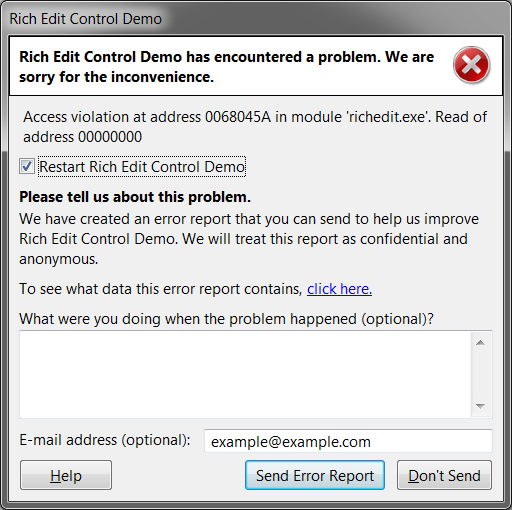
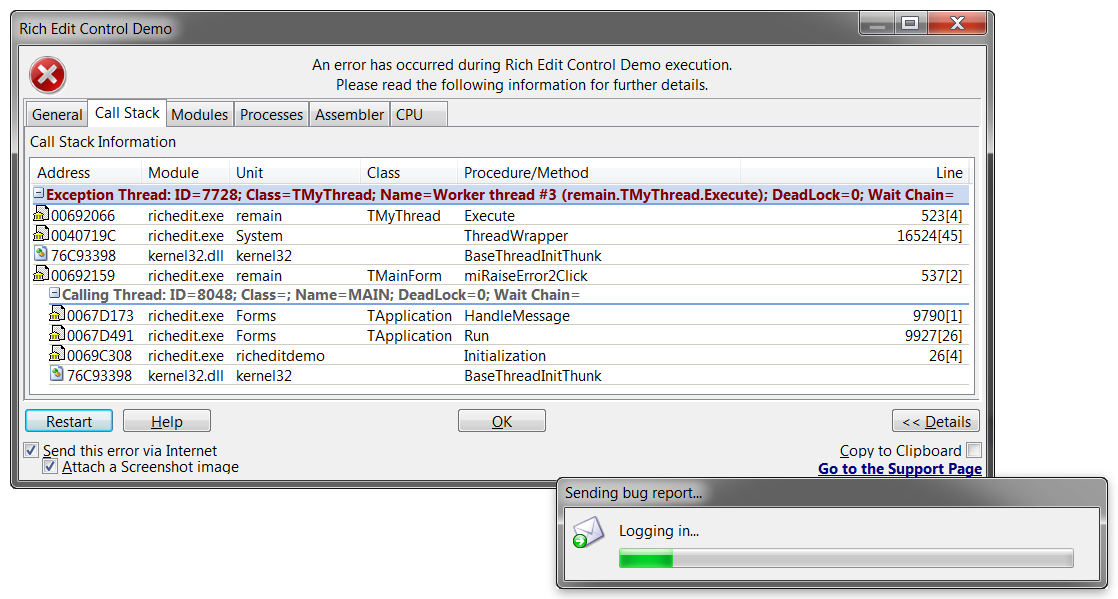
Each topic below links to the chapter of the Developer Guide that documents the mechanism and its limits.
EurekaLog detects UI freezes and deadlocks and reports them with the call stack of the stuck thread.
EurekaLog tracks allocations through Delphi's memory manager and reports memory leaks at shutdown, with the call stack of each block. The same feature catches double frees, heap buffer overflows and calls on already-freed objects.
Chapter 12: leak detection from code
An exception in a worker thread is reported with that thread's name and stack, instead of being lost with it. Call stack entries from a DLL or a package are resolved with that module's own debug information, whether the tracer sits in the host or in the module.
Chapter 21: multi-threaded applications
EurekaLog files each report straight into your tracker with issue lookup, grouping, counting and closed-issue feedback: Jira, Mantis, Bugzilla, YouTrack, Redmine, GitLab, GitHub, Exceptionless and FogBugz.
EurekaLog posts the report to your own HTTPS endpoint, so it lands on your server instead of in a mailbox.
GUI apps can send reports automatically or show a dialog for consent, contact details and steps to reproduce. Services, console apps and any app without a GUI can send reports with no user interaction.
From Delphi 5 and C++Builder 2006 onward: Windows applications on Win32 and Win64 (VCL, FireMonkey, console applications, services, DLLs and packages). It also runs in the 64-bit IDE (12.3 or later).
Latest version 7.16.2.1 (Oct 20, 2026) · What changed in 7.16.2.1