Registering EurekaLog into IDE |
  
|
Registering EurekaLog into IDE |
|
|
You can register and unregister EurekaLog in any of your IDE after EurekaLog's installation completes:
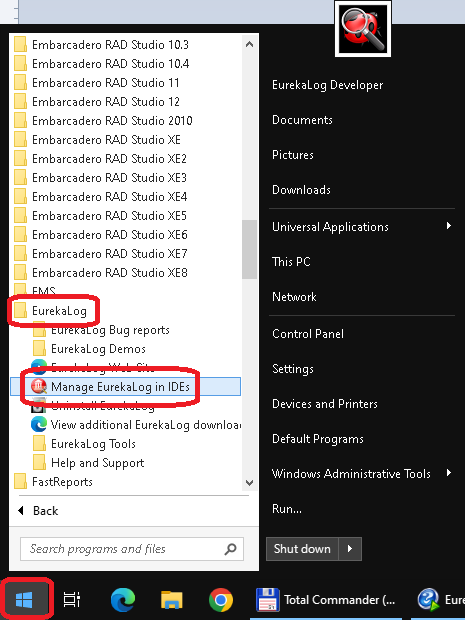
EurekaLog ships the "Manage EurekaLog in IDEs" tool, which you can find in: Start Menu / Programs / EurekaLog / Manage EurekaLog in IDEs:
The "Manage EurekaLog in IDEs" tool in Windows Start Menu
Or you can run it directly via \Bin\ManageProfiles.exe (from EurekaLog's installation folder).
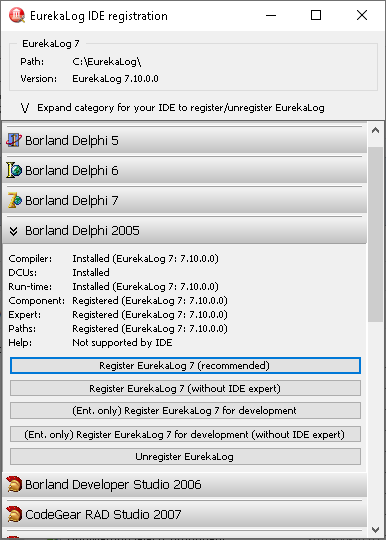
You can expand category for your IDE. Don't see your IDE version? And click on the "Register EurekaLog 7 (recommended)" button. This will perform per-user registration of EurekaLog into the selected IDE:
"Manage EurekaLog in IDEs" tool
You can also click on the "Unregister EurekaLog" to completely remove EurekaLog from the selected IDE, while keeping EurekaLog installed on disk. Your IDE will think EurekaLog is uninstalled.
Important Note: The "Manage" tool will ask for elevation when run under administrator account. Admin rights are required to add or remove packages (BPL files) to/from Windows System folder. If you run the "Manage" tool under a limited user account, the tool will not ask you for elevation: BPL files will be untouched, while other actions will be performed. Please, read this guide for more details.
See also:
| ||||||||