
Problem:
EurekaLog (IDE add-on) and/or EurekaLog's tools use bad/unreadable font.
Reason:
EurekaLog use system's settings for fonts. It uses lfMessageFont (SystemParametersInfo with SPI_GETNONCLIENTMETRICS) for general font and GetStockObject(ANSI_FIXED_FONT) for mono-width font.
Solution:
A). Adjust your system font settings.
B). Specify override for fonts settings:
- Open regedit.exe
- Navigate to HKEY_CURRENT_USER\Software\EurekaLab\EurekaLog\7.0
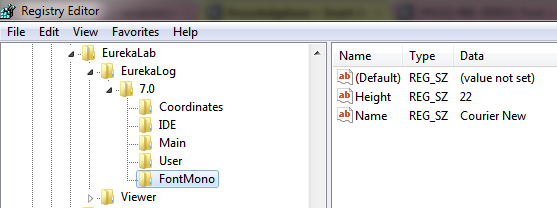
- Create subkeys "FontGUI" and "FontMono" (without quotes).
- Create one or more string values with the following possible names: "Name", "Height", "Style", "Charset", "Orientation", "Pitch", "Quality". Specify your own values.
Example:
Note: both solutions are applicable for any tool, including EurekaLog Viewer.